GRPO
Changelog
2025-06-22 - Refactored multi-round training and added support for AsyncEngine. Refer to the documentation.
2025-05-29 — Added support for padding-free (
--padding_free true) and sequence parallelism (--sequence_parallel_size N).2025-05-23 — Added support for custom sampling batch size. Refer to the
generation_batch_size/steps_per_generationparameters.2025-05-22 — Swift rollout now supports the
data_parallel_sizeparameter.2025-05-16 - Added ref_model synchronization logic. Refer to the
sync_ref_modelparameter.2025-05-13 — Refactored GRPOTrainer code for better readability and maintainability. Internal mode now supports vLLM>=0.8.
2025-05-11 — Added support for generative reward models. Custom reward model logic can be implemented via
reward_model_plugin. For more details, refer to the [documentation](../DeveloperGuide/Reward Model) section.2025-04-30 — The startup command for the external vLLM server has been changed to
swift rollout.
GRPOTrainer underwent a code refactoring in ms-swift3.5. If you are using a swift version < 3.5, please refer to the stable documentation.
GRPO (Group Relative Policy Optimization) leverages intra-group relative advantage calculations to replace the independent value model in the PPO algorithm and directly incorporates KL divergence penalties into the loss function to improve training stability.
GRPO Objective Function
\( {\scriptstyle \begin{aligned} \mathcal{J}_{G R P O}(\theta) & =\mathbb{E}_{\left[q \sim P(Q),\left\{o_i\right\}_{i=1}^G \sim \pi_{\theta_{o l d}}(O \mid q)\right]} \\ & \frac{1}{G} \sum_{i=1}^G \frac{1}{\left|o_i\right|} \sum_{t=1}^{\left|o_i\right|}\left\{\min \left[\frac{\pi_\theta\left(o_{i, t} \mid q, o_{i,<t}\right)}{\pi_{\theta_{o l d}}\left(o_{i, t} \mid q, o_{i,<t}\right)} \hat{A}_{i, t}, \operatorname{clip}\left(\frac{\pi_\theta\left(o_{i, t} \mid q, o_{i,<t}\right)}{\pi_{\theta_{o l d}}\left(o_{i, t} \mid q, o_{i,<t}\right)}, 1-\varepsilon, 1+\varepsilon\right) \hat{A}_{i, t}\right]-\beta \mathbb{D}_{K L}\left[\pi_\theta| | \pi_{r e f}\right]\right\} \end{aligned} } \)
The advantage function is defined as
\( \hat{A}_{i,t} = \frac{R_i - \text{mean}(\{R_j\}_{j=1}^G)}{\text{std}(\{R_j\}_{j=1}^G)} \)
GRPO Algorithm Pseudocode
# ========== 1. Rollout Generation Phase ==========
prompt = "Question: Which is bigger? 9.11 or 9.9?"

# Generate multiple completions through parallel sampling
completions = rollout_function(
    model=current_policy_model,
    prompt=prompt,
    num_generations=8,  # Hyperparameter: number of samples per prompt
    temperature=1.0     # Hyperparameter: sampling diversity
)
"""
completions = [
    (completion 1) "The larger number is 9.11...",
    (completion 2) "9.9 is bigger than...",
    ...
    (completion 8) "After calculation, 9.11..."
]
"""

# ========== 2. Reward Calculation Phase ==========
# Evaluate generated completions using reward model
rewards = reward_function(
    completions=completions,
    ground_truth="9.11"  # Expected correct answer
)
"""
rewards = [
    (reward 1) 1.0,  # Correct answer
    (reward 2) 0.0,  # Incorrect
    ...
    (reward 8) 1.0   # Correct
]
"""

# Normalize rewards to advantages
rewards_mean = mean(rewards)  # μ = 0.5
rewards_std = std(rewards)    # σ = 0.25
advantages = (rewards - rewards_mean) / (rewards_std + 1e-8)  # Standardization
"""
advantages = [
    (advantage 1)  2.0,  # (1.0 - 0.5)/0.25
    (advantage 2) -2.0,
    ...
    (advantage 8)  2.0
]
"""

# ========== 3. Policy Optimization Phase ==========
# Get token-level log probabilities from different models
current_logps = get_per_token_logps(current_policy_model, prompt, completions)  # π_θ
old_logps = get_per_token_logps(old_policy_model, prompt, completions)          # π_θ_old
ref_logps = get_per_token_logps(reference_model, prompt, completions)           # π_ref

# PPO Clipped Objective
is_ratio = exp(current_logps - old_logps)  # Importance sampling ratio: e^(π_θ - π_θ_old)
clipped_ratio = clip(is_ratio, 1-ε, 1+ε)   # ε=0.2 typically

# Policy gradient term (dual form)
policy_loss = -mean(
    minimum(is_ratio * advantages,       # Unclipped objective
           clipped_ratio * advantages)  # Clipped objective
)

# KL Divergence Penalty (K3 estimator)
# KL(π_θ||π_ref) ≈ e^(logπ_ref - logπ_θ) - (logπ_ref - logπ_θ) - 1
kl_penalty = beta * mean(
    exp(ref_logps - current_logps) -
    (ref_logps - current_logps) - 1
)

# Total Loss = Policy Loss + KL Penalty
total_loss = policy_loss + kl_penalty

# ========== 4. Update Rule ==========
# Apply gradient descent to minimize total_loss
optimizer.zero_grad()
total_loss.backward()
optimizer.step()
For training script examples, refer to examples.
For GRPO parameters, refer to the documentation
Cluster Support
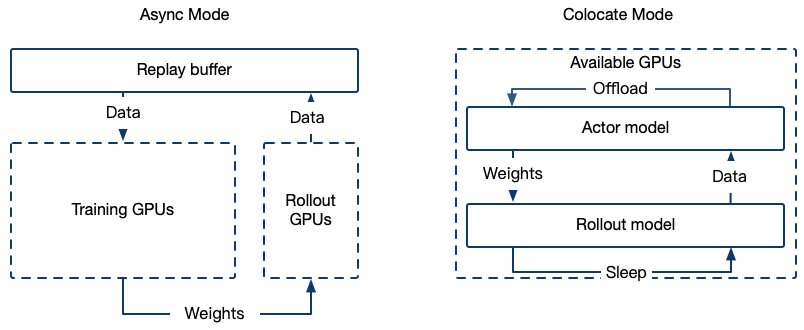
The GRPO training framework supports integration with high-performance inference engines (e.g., vLLM) to accelerate the sampling process, offering the following two deployment modes:
1. Colocate (Internal) Mode
Training and inference share GPU resources, with the inference service launched internally within the Trainer.
Startup parameters
--use_vllm true \
--vllm_mode colocate
Memory Optimization Solutions in Colocate Mode
When running in Colocate mode, out-of-memory (OOM) issues may frequently occur. Below are several effective memory optimization methods and parameter configurations:
Reduce the vllm_gpu_memory_utilization parameter.
During the training phase, release the GPU memory occupied by vLLM:
--sleep_level 1
During the vLLM inference phase, release the GPU memory occupied by the model and optimizer:
--offload_optimizer true \
--offload_model true \
Use Tensor Parallelism in vLLM:
--vllm_tensor_parallel_size [tp_size]
Gather model weights in batches (when synchronizing vLLM weights under zero3):
--move_model_batches [批次数量]
2. Async(External) Mode
Training and inference resources are separated, with a dedicated inference server deployed.
Use the swift rollout command to deploy the vLLM server (currently only supports vLLM backend):
CUDA_VISIBLE_DEVICES=0 \
swift rollout \
  --model Qwen/Qwen2.5-VL-7B-Instruct \
  --tensor_parallel_size 2 \
  --data_parallel_size 1

CUDA_VISIBLE_DEVICES=0,1 \
swift rollout \
  --model Qwen/Qwen2.5-VL-7B-Instruct \
  --tensor_parallel_size 2 \
  --data_parallel_size 1

CUDA_VISIBLE_DEVICES=0,1,2,3 \
swift rollout \
  --model Qwen/Qwen2.5-VL-7B-Instruct \
  --tensor_parallel_size 2 \
  --data_parallel_size 2
For more rollout parameters, refer to the vllm arguments and rollout arguments
Note: When set use_async_engine, enabling only DP (Data Parallelism) may cause errors. Related issue. If errors occur, try enabling both TP (Tensor Parallelism) and DP.
To configure the external vLLM server during training, use the following parameters:
--use_vllm true \
--vllm_mode server \
--vllm_server_host <server_IP> \
--vllm_server_port <service_port> \
--vllm_server_timeout <timeout> \
FAQ
1. Loss Equals Zero / Approaches Zero / Is Negative During Training
This is normal behavior. For reference, see issue.
2. num_generations / Batch Size Related
In GRPO, the batch size is measured in terms of completions (i.e., model-generated outputs). For example, setting per_device_train_batch_size=8 means that each GPU processes 8 completions for loss calculation during training.
During the training phase, the total effective batch size in a full gradient accumulation step equals:
effective_batch_size = num_processes * per_device_train_batch_size * gradient_accumulation_steps
During the sampling phase, the total batch size (completion-level) depends on the following:
If generation_batch_size is set, the total equals generation_batch_size.
If steps_per_generation is set, the total equals steps_per_generation * effective_batch_size.
By default, it equals the effective batch size: num_processes * per_device_train_batch_size * gradient_accumulation_steps. During evaluation, the number of completions equals:
num_processes * per_device_eval_batch_size
The parameter num_generations must be divisible by the total batch size used in sampling and evaluation to ensure even distribution across devices.
Example
num_processes = 8
per_device_train_batch_size = 4
gradient_accumulation_steps = 8
generation_batch_size = 512
num_generations = 64
Total prompts needed for sampling: 512 / 64 = 8
Generate 512 responses from the model per sampling step
Model update batch size: 8 * 4 * 8 = 256
3. Why did KL result in NaN?
With overlong_filter enabled, all completions on a certain GPU were truncated.
4. How is the training steps calculated?
Refer to issue.
5. Why is the clip ratio always 1?
The core purpose of the clip mechanism is to limit the magnitude of policy updates to prevent policy performance collapse due to excessively large updates (i.e., a drastic decline in performance after policy updates). The specific formula for the clip operation is as follows:
Where: \(r_{t}(\theta) = \frac{\pi_{\theta}(a_{t} \mid s_{t})}{\pi_{\text{old}}(a_{t} \mid s_{t})}\) is the importance sampling ratio, which measures the difference between the new and old policy. \(\hat{A}_{t}\) is the advantage function, representing the relative return of the action. \(\epsilon\) is used to limit the deviation range of \(r_{t}(\theta)\).
In the on-policy training process, since each update uses data generated by the latest policy, the new and old policies are the same, i.e., \(\pi_{\theta} = \pi_{\text{old}}\).
Thus, the importance sampling ratio is always 1, and the clip operation does not take effect.
The algorithm becomes off-policy (near-on-policy) under the following parameter settings:
num_iterations > 1
gradient_accumulation_steps % steps_per_generation != 0
Refer to issue.
6. Why is there a validation process even when val_dataset is not set, and how can I disable it?
When val_dataset is not explicitly passed, the split_dataset_ratio parameter is responsible for splitting part of the dataset into a validation dataset, which defaults to splitting 1% of the data. (In “ms-swift>=3.6”, the default value of split_dataset_ratio will be changed from 0.01 to 0.)
To disable the validation process, set --split_dataset_ratio 0.
7. How to set the training mini-batch size
In GRPO training, we can configure mini-batch updates in the following two ways:
Configuration options:
Set
generation_batch_sizeto be an integer multiple of the training global batch size.Or set
steps_per_generationto be an integer multiple ofgradient_accumulation_steps.
Typical configuration example: When configured with: steps_per_generation = 16 gradient_accumulation_steps = 8
The results from one rollout will be split into two mini-batch updates.