GYM Environment Training
GYM-style environment training wraps the “model → environment → reward” chain behind an abstract interface, letting the LLM interact with the environment as an Agent over multiple turns. The reward of each step is produced directly by the environment, so you don’t need a separate reward function to infer it from the trajectory. This document first introduces the interface, then walks through a complete custom example (FrozenLake) showing how to plug it into training.
Gym interface
GYM originates from the Gymnasium library. In ms-swift we define the following interface:
class Env(ABC):

    def __init__(self, env_config):
        """env_config comes from the env_config column of each dataset row and carries initialization arguments."""
        self.env_config = env_config

    @abstractmethod
    async def reset(self, config: RolloutInferRequest) -> Tuple[str, Dict[str, Any], str]:
        """
        Returns:
            - observation: sent to the model as the first user message
            - info: debug/log information, recorded in completions.jsonl
            - system_message: system prompt for this trajectory
        """
        pass

    @abstractmethod
    async def step(self, action: Messages) -> Tuple[str, float, bool, Dict[str, Any]]:
        """
        Args:
            action: the complete conversation messages so far; the last one is the model's latest reply
        Returns:
            - next_observation: next user message
            - reward: reward for the current step
            - done: whether the trajectory is finished
            - info: debug/log information
        """
        pass

    @abstractmethod
    async def close(self):
        """Release resources."""
        pass
The RolloutInferRequest received by reset contains the dataset row’s messages, data_dict (extra columns including env_config), etc. See the input example for the full structure.
If you need extra control over the conversation history between turns (e.g. dynamic compression, injecting hints), subclass
MultiTurnSchedulerand implementon_trajectory_start/on_turn_endhooks, or overridestep/run— see the multi-turn doc.
Launching training
Use the built-in gym_scheduler to wire the env into multi-turn rollout.
GYMScheduler is based on the generic hook protocol:
Inherits
MultiTurnScheduler— no need to override therunmethodImplements
on_trajectory_start(callsenv.reset) andon_turn_end(callsenv.step)Works with both server mode (
run()) and colocate mode (run_multi_turn())
User-defined envs are loaded via --external_plugins your_plugin.py; the plugin runs envs['my_env'] = MyEnv to register them (the FrozenLake example below demonstrates the full pattern).
The built-in GYMScheduler completes the control logic via hooks:
class GYMScheduler(MultiTurnScheduler):
    def on_trajectory_start(self, requests):
        # Create an env for each request, call env.reset, inject initial observation
        for req in requests:
            env = self._create_env(req.data_dict.get('env_config', {}))
            observation, info, system_message = env.reset(req)
            req.messages = [system_msg, user_msg(observation)]
            self._envs[req.uuid] = env

    def on_turn_end(self, req, response_choice, current_turn):
        # Call env.step, accumulate reward, return done + rollout_infos
        next_obs, reward, done, info = env.step(deepcopy(req.messages))
        self._total_rewards[req.uuid] += reward
        return {
            'done': done,
            'rollout_infos': {
                'total_reward': self._total_rewards[req.uuid],
                'step_rewards': [...],
            }
        }

    def step(self, req, response_choice, current_turn):
        # Inject the next observation into a user message
        if self._pending_obs.get(req.uuid):
            req.messages.append({'role': 'user', 'content': next_obs})
        return {'infer_request': req}
Colocate mode:
megatron rlhf \
    --rlhf_type grpo \
    --vllm_mode colocate \
    --external_plugins examples/megatron/grpo/multi_turn/frozen_lake_plugin.py \
    --multi_turn_scheduler gym_scheduler \
    --gym_env frozen_lake \
    --use_gym_env true \
    --max_turns 10 \
    ...

# swift rlhf works the same way
Server mode
swift rollout \
    --model xxx \
    --use_gym_env true \
    --external_plugins examples/megatron/grpo/multi_turn/frozen_lake_plugin.py \
    --multi_turn_scheduler gym_scheduler \
    --gym_env frozen_lake \
    --max_turns 10

# On the trainer side, add --vllm_server_pass_dataset true so the env_config column reaches the rollout server.
megatron rlhf --vllm_mode server --vllm_server_pass_dataset true ...
# or swift rlhf --vllm_mode server --vllm_server_pass_dataset true ...
Two ways to select the environment:
Set it globally via
--gym_env env_name(recommended — one env for the whole script);Or specify it per dataset row via
env_config.name(for mixed-env workloads; overrides--gym_env).
Example: writing a FrozenLake environment from scratch
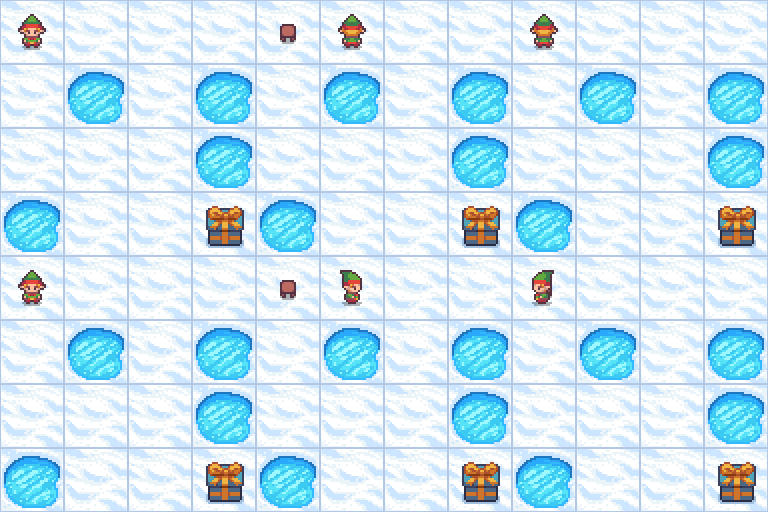
FrozenLake is a classic task from OpenAI Gym: the agent starts at the start cell, must cross a frozen lake to reach the goal, and avoid holes along the way. The original environment is illustrated above. The walkthrough below uses a text-only version of it (the same grid rendered as ASCII).
Full source: frozen_lake_plugin.
1. Define the Env
Each dataset row produces a freshly generated random 4x4 map (random holes + random S/G positions, BFS-validated to be solvable). Cell meanings: S start / G goal / H hole (stepping in = fail) / F safe ice / P player’s current position.
class FrozenLakeEnv(Env):
    def __init__(self, env_config):
        super().__init__(env_config)
        self.size = int(env_config.get('size', 4))
        self.p = float(env_config.get('p', 0.8))
        seed = env_config.get('seed')
        self.seed = int(seed) if seed is not None else None

    async def reset(self, config: RolloutInferRequest):
        self.grid = generate_random_map(size=self.size, p=self.p, seed=self.seed)
        ...
        return observation, {'seed': self.seed}, SYSTEM_PROMPT

    async def step(self, action: Messages):
        move = _parse_action(action[-1]['content'])  # <action>up|down|left|right</action>
        # Advance one cell, check G / H; the outer max_turns is enforced by the scheduler.
        if cell == 'G': return obs, 1.0, True, {'status': 'goal'}
        if cell == 'H': return obs, 0.0, True, {'status': 'hole'}
        ...
2. Register
Hook the env class into swift’s envs registry. --external_plugins imports the file at startup, so the registration takes effect automatically:
# examples/megatron/grpo/multi_turn/frozen_lake_plugin.py
from swift.rollout.gym_env import Env, envs

class FrozenLakeEnv(Env):
    ...

envs['frozen_lake'] = FrozenLakeEnv
3. Prepare the dataset
The dataset is just a placeholder here — the actual data is constructed by the env, with env_config.seed controlling map-generation randomness:
{"messages":[{"role":"user","content":"<placeholder>"}],"env_config":{"seed":0}}
{"messages":[{"role":"user","content":"<placeholder>"}],"env_config":{"seed":1}}
...
{"messages":[{"role":"user","content":"<placeholder>"}],"env_config":{"seed":127}}
4. (Optional) Blend in extra rewards
With --use_gym_env true, the env-provided total_reward is automatically added as one reward column — no reward function is required. To mix in additional signals (e.g. format/length checks), just pass them via --reward_funcs; the gym reward is appended as an extra column and blended with the reward_funcs through --reward_weights. For example, also enabling a format reward:
megatron rlhf ... --use_gym_env true --reward_funcs format --reward_weights 0.2 1.0
# the last entry of reward_weights corresponds to the gym total_reward
5. Train
Runnable script: examples/megatron/grpo/multi_turn/frozen_lake.sh
During training, observe rollout_infos.num_turns (steps per trajectory) and the reward mean in the logs. --log_completions true writes full conversations to completions.jsonl, so you can verify the model outputs in the <action>...</action> format turn by turn.
References:
https://gymnasium.farama.org/environments/toy_text/frozen_lake/
https://github.com/alibaba/ROLL/tree/main/roll/pipeline/agentic/env/frozen_lake
OpenEnv Environment Training
OpenEnv is an open-source Agentic RL environment framework by HuggingFace that communicates with environment servers via WebSocket. Unlike the local Env interface used by FrozenLake above, OpenEnv places environment logic in a separate server process, and swift communicates with it through OpenEnvScheduler + OpenEnvWrapper.
Architecture Comparison
| Feature | Built-in Gym (GYMScheduler) |
OpenEnv (OpenEnvScheduler) |
|---|---|---|
| Environment location | In-process (Python object) | Standalone server (WebSocket) |
| Environment interface | Subclass Env, implement reset/step/close |
Server provides HTTP/WebSocket API |
| Registration | --external_plugins + envs registry |
--external_plugins + multi_turns registry |
| Use case | Lightweight local envs (FrozenLake, etc.) | Complex server envs (TextArena, CARLA, etc.) |
| Concurrency control | Not needed | Built-in Semaphore for connection limiting |
OpenEnvScheduler
OpenEnvScheduler extends GYMScheduler, replacing the local Env with OpenEnvWrapper (a WebSocket client). Key design:
_create_env: Creates anOpenEnvWrapperconnected to the OpenEnv serveron_trajectory_start: Creates a wrapper per request, callsreset(), uses Semaphore to limit concurrency (default 4)on_turn_end: Parses model output, callswrapper.step(), accumulates rewardparse_action(overridable): Converts model text to action dict, defaultjson.loadsformat_observation(overridable): Converts server observation to string, defaultjson.dumps
Users subclass OpenEnvScheduler and override parse_action, format_observation, on_trajectory_start, and on_turn_end to adapt to specific environments.
Example: Sudoku Environment
Using TextArena Sudoku as an example, the model places numbers on a 9x9 Sudoku grid via [row col number] format. Full code: sudoku_scheduler.py.
1. Start OpenEnv Server
Install OpenEnv and the Sudoku environment package (textarena and nltk are installed automatically as dependencies):
pip install openenv
pip install git+https://huggingface.co/spaces/openenv/sudoku
Use the provided startup script to start the local server (default port 8000). MAX_CONCURRENT_ENVS must be ≥ num_generations used in training:
TEXTARENA_ENV_ID=Sudoku-v0 MAX_CONCURRENT_ENVS=8 python examples/train/grpo/plugin/openenv/start_sudoku_server.py
The default
python -m textarena_env.server.apponly supports 1 concurrent session, which is insufficient for GRPO’s parallel multi-generation sampling.start_sudoku_server.pylifts this restriction by settingSUPPORTS_CONCURRENT_SESSIONS.
Point base_url to the local server in your dataset:
{"messages":[{"role":"user","content":"Play"}],"env_config":{"name":"openenv","base_url":"http://127.0.0.1:8000"}}
2. Custom Scheduler
Subclass OpenEnvScheduler to implement Sudoku-specific action parsing, observation formatting, and multi-component rewards:
from swift.rollout.multi_turn import OpenEnvScheduler

class SudokuScheduler(OpenEnvScheduler):
    def __init__(self, *args, **kwargs):
        super().__init__(*args, **kwargs)
        self._last_content_len = {}  # Content diff tracking

    async def on_trajectory_start(self, requests):
        # Create env, parse board, generate hints
        # hints include 'guaranteed moves' and candidate numbers
        ...

    async def on_turn_end(self, infer_request, response_choice, current_turn):
        # Parse [row col number], step env
        # Compute 5-component reward: empty_cell / valid_move / repetition / progress / correct
        # Return updated board + hints as next observation
        ...

    def parse_action(self, text):
        import re
        match = re.search(r'\[\s*(\d+)\s+(\d+)\s+(\d+)\s*\]', text)
        if match:
            row, col, num = match.groups()
            return {"message": f"[{row} {col} {num}]"}
        return {"message": "[1 1 1]"}
Multi-component reward system (adapted from TRL Sudoku example):
| Reward component | Calculation | Purpose |
|---|---|---|
empty_cell_reward |
Targets empty cell +1 / overwrites -1 | Guide model to valid positions |
valid_move_reward |
Valid new move +1 / warning -0.5 / invalid 0 | Encourage legal moves |
repetition_reward |
Exponential penalty for repeats (-2^n, cap -10) | Avoid repetition |
progress_reward |
(filled - initial) / (81 - initial) | Measure solving progress |
correct_reward |
Binary reward from environment | Puzzle fully solved |
Combined reward = sum of component averages, providing denser learning signal than a single binary reward.
3. Hints System
At each turn, the scheduler parses the current board state and provides hints to the model:
GUARANTEED MOVES: Cells with only one candidate (can be filled directly)
Other options: Cells with 2-3 candidates
MOVES ALREADY TRIED: Previously attempted moves (to avoid repetition)
This significantly reduces exploration difficulty and enables the model to make more valid moves.
4. Prepare Dataset
The dataset serves as a placeholder; actual boards are generated by the environment server. Point base_url to the OpenEnv hosted address:
{"messages":[{"role":"user","content":"Play"}],"env_config":{"name":"openenv","base_url":"http://127.0.0.1:8000"}}
5. Register Scheduler
sudoku_scheduler.py includes registration code at the end, loaded via --external_plugins:
# End of sudoku_scheduler.py
from swift.rollout.multi_turn import multi_turns
multi_turns['sudoku_scheduler'] = SudokuScheduler
6. Start Training
swift rlhf \
    --rlhf_type grpo \
    --model Qwen/Qwen3.5-4B \
    --dataset examples/train/grpo/plugin/openenv/sudoku.jsonl \
    --external_plugins examples/train/grpo/plugin/openenv/sudoku_scheduler.py \
    --enable_thinking false \
    --max_completion_length 256 \
    --use_gym_env true \
    --multi_turn_scheduler sudoku_scheduler \
    --max_turns 20 \
    --use_vllm true \
    --vllm_mode colocate \
    ...
Runnable script: examples/train/grpo/plugin/openenv/run_grpo_sudoku.sh
Notes
vLLM mode: The example above uses
--vllm_mode colocate, where vLLM and training share the same GPUs. If using--vllm_mode server, you need to startswift rolloutseparately as the vLLM server, and--multi_turn_scheduler/--max_turnsshould be passed toswift rlhf, notswift rollout.Server concurrency:
start_sudoku_server.py’sMAX_CONCURRENT_ENVSmust be ≥num_generationsused in training. The defaultpython -m textarena_env.server.apponly supports 1 concurrent session.Content diff: Environments like TextArena return cumulative messages (full history each turn). The scheduler tracks
_last_content_lento return only the new portion, preventing context length explosion.First-turn timing:
on_trajectory_startis called BEFORE the first rollout, ensuring the model sees the actual environment observation (e.g., Sudoku board) rather than the placeholder text from the dataset.enable_thinking: When using Qwen3.5 series models, set
--enable_thinking falseto skip<think>block generation.Sync I/O:
OpenEnvWrapper’sreset()/step()are synchronous WebSocket calls.OpenEnvSchedulersubclasses should wrap these calls withasyncio.to_thread()to avoid blocking the event loop.