# 多轮训练
注意:该 feature 需要使用 ms-swift>=3.6
在强化学习训练场景中,模型采样可能需要与环境进行多轮交互(如工具调用、外部API访问等)。这种交互式训练要求模型能够根据环境反馈信息进行连续推理。本文档将详细介绍如何在 GRPO 训练中自定义多轮训练流程。
根据环境反馈插入方式不同,多轮可以分为:
- 新一轮推理:环境反馈结果作为 query,模型进行新一轮对话轮次进行响应
- 当轮续写:环境反馈结果插入模型当前回复中,模型在此基础上继续续写后续内容
我们可以自定义并通过参数 `multi_turn_scheduler` 设置多轮采样的规划器来实现多轮采样逻辑
```
--multi_turn_scheduler xxx
--max_turns xxx
```
两种方式的实现例子可以参考[最佳实践](#最佳实践)
## 多轮规划器 MultiTurnScheduler
多轮规划器是多轮训练的核心组件,其工作流程如下图所示:
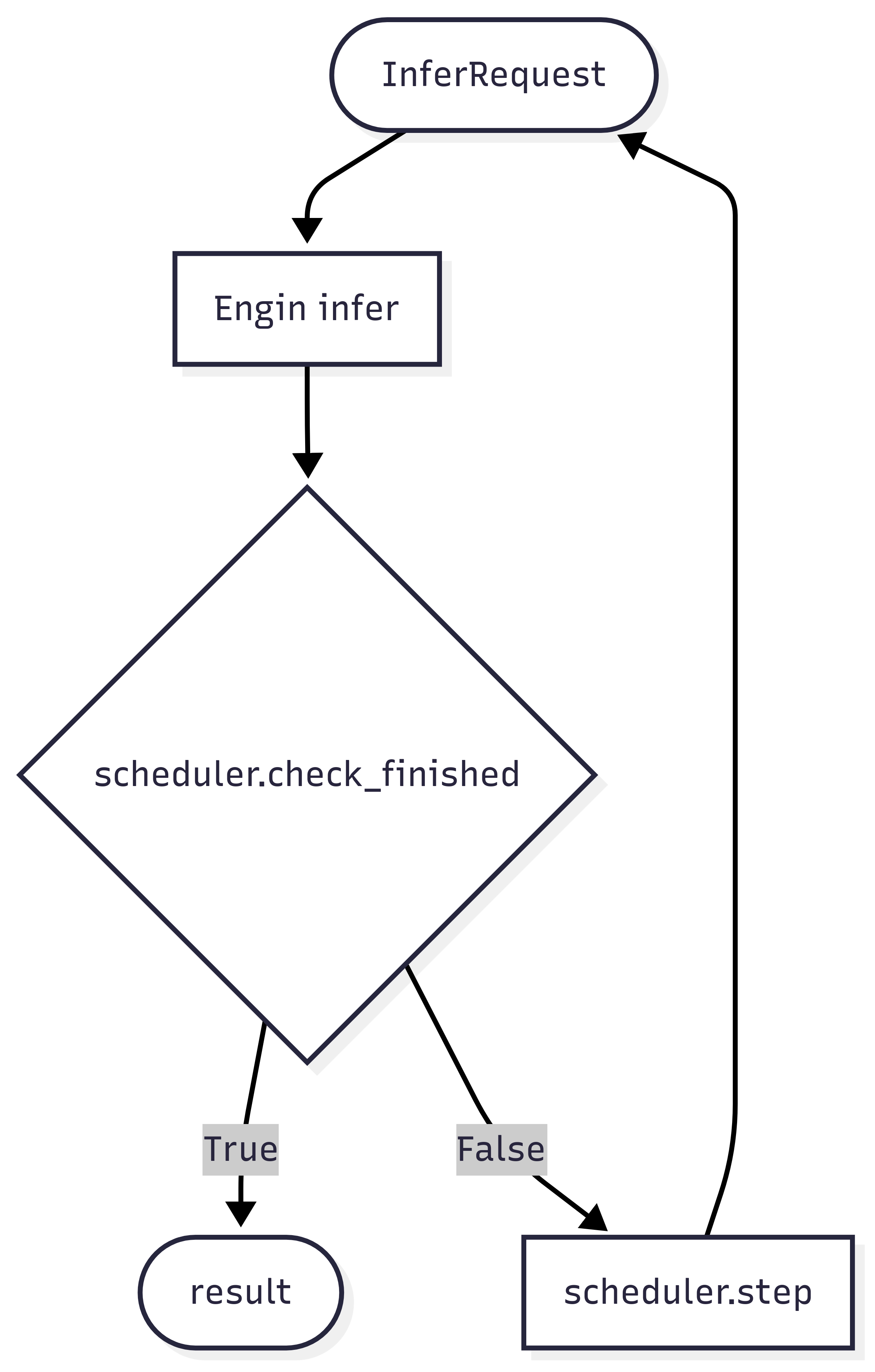 多轮规划器主要承担两大功能:
- 终止条件判断:通过 check_finished 方法判断当前轮次推理是否应该结束
- 推理请求构造:通过 step 方法构建下一轮推理的请求对象
抽象基类 MultiTurnScheduler 代码如下
```python
class MultiTurnScheduler(ABC):
def __init__(self, max_turns: Optional[int] = None, *args, **kwargs):
self.max_turns = max_turns
@abstractmethod
def step(self, infer_request: 'RolloutInferRequest', result: 'RolloutResponseChoice',
current_turn: int) -> Union['RolloutInferRequest', Tuple['RolloutInferRequest', Dict]]:
pass
def check_finished(self, infer_request: 'RolloutInferRequest', result: 'RolloutResponseChoice',
current_turn: int) -> bool:
if result.finish_reason == 'length':
return True
if self.max_turns and current_turn >= self.max_turns:
return True
return False
```
> 如果你想要奖励函数获取多轮交互中的信息,请在 step 方法中返回额外的 dict 对象, 在奖励函数中的 kwargs中,获取 `multi_turn_infos`
```python
class Scheduler():
def step(self, infer_request: 'RolloutInferRequest', result: 'RolloutResponseChoice',
current_turn: int) -> Union['RolloutInferRequest', Tuple['RolloutInferRequest', Dict]]:
...
return infer_request, extra_dict
class RewardFunction():
def __call__(self, completions, **kwargs):
infos = kwargs.get('multi_turn_infos', {})
...
```
step 和 check_finished 方法接收参数:
- infer_request: 上轮的推理请求,包括
- `messages` 键包含了模型的交互历史(注意:已包括当前模型推理结果)
- 多模态信息,如 `images`
- `data_dict` 包含了数据集中的其他列
- result: 上轮的推理结果,
- current_turn: 当前推理轮次 (从1开始)
入参示例
```python
infer_request
"""
RolloutInferRequest(
messages=[
{'role': 'system', 'content': 'A conversation between User and Assistant. The user asks a question, and the Assistant solves it. The assistant first thinks about the reasoning process in the mind and then provides the user with the answer. The reasoning process and answer are enclosed within and tags, respectively, i.e., reasoning process here answer here \n'}, {'role': 'user', 'content': 'What is the value of $\\sqrt{36 \\times \\sqrt{16}}$?'},
{'role': 'assistant', 'content': 'To find the value of \\(\\sqrt{36 \\times \\sqrt{16}}\\), we will break down the problem step-by-step.\n\nFirst, we need to evaluate the inner square root:\n\\[\n\\sqrt{16}\n\\]\nWe know that:\n\\[\n4^2 = 16 \\implies \\sqrt{16} = 4\n\\]\n\nNext, we substitute this result back into the original expression:\n\\[\n\\sqrt{36 \\times \\sqrt{16}} = \\sqrt{36 \\times 4}\n\\]\n\nNow, we need to evaluate the product inside the square root:\n\\[\n36 \\times 4 = 144\n\\]\n\nSo, the expression simplifies to:\n\\[\n\\sqrt{144}\n\\]\n\nFinally, we determine the square root of 144:\n\\[\n\\sqrt{144} = 12\n\\]\n\nThus, the value of \\(\\sqrt{36 \\times \\sqrt{16}}\\) is:\n\\[\n\\boxed{12}\n\\]'}
],
images=[],
audios=[],
videos=[],
tools=None,
objects={},
data_dict={
'problem': 'What is the value of $\\sqrt{36 \\times \\sqrt{16}}$?',
'solution': "To solve the problem, we need to evaluate the expression \\(\\sqrt{36 \\times \\sqrt{16}}\\).\n\nWe can break down the steps as follows:\n\n1. Evaluate the inner square root: \\(\\sqrt{16}\\).\n2. Multiply the result by 36.\n3. Take the square root of the product obtained in step 2.\n\nLet's compute this step by step using Python code for accuracy.\n```python\nimport math\n\n# Step 1: Evaluate the inner square root\ninner_sqrt = math.sqrt(16)\n\n# Step 2: Multiply the result by 36\nproduct = 36 * inner_sqrt\n\n# Step 3: Take the square root of the product\nfinal_result = math.sqrt(product)\nprint(final_result)\n```\n```output\n12.0\n```\nThe value of \\(\\sqrt{36 \\times \\sqrt{16}}\\) is /\\(\\boxed{12}\\)."
}
)
"""
result
"""
RolloutResponseChoice(
index=0,
message=ChatMessage(
role='assistant',
content='To find the value of \\(\\sqrt{36 \\times \\sqrt{16}}\\), we will break down the problem step-by-step.\n\nFirst, we need to evaluate the inner square root:\n\\[\n\\sqrt{16}\n\\]\nWe know that:\n\\[\n4^2 = 16 \\implies \\sqrt{16} = 4\n\\]\n\nNext, we substitute this result back into the original expression:\n\\[\n\\sqrt{36 \\times \\sqrt{16}} = \\sqrt{36 \\times 4}\n\\]\n\nNow, we need to evaluate the product inside the square root:\n\\[\n36 \\times 4 = 144\n\\]\n\nSo, the expression simplifies to:\n\\[\n\\sqrt{144}\n\\]\n\nFinally, we determine the square root of 144:\n\\[\n\\sqrt{144} = 12\n\\]\n\nThus, the value of \\(\\sqrt{36 \\times \\sqrt{16}}\\) is:\n\\[\n\\boxed{12}\n\\]', tool_calls=None),
finish_reason='stop',
logprobs=None,
messages=None)
"""
# result.messages will be copied at the end of multi-turn inference.
```
默认的 `check_finished` 逻辑会在两种情况下停止推理
- 模型回复被截断,即超出了 `max_completion_length`
- 模型推理轮数超出了限制的最大轮数
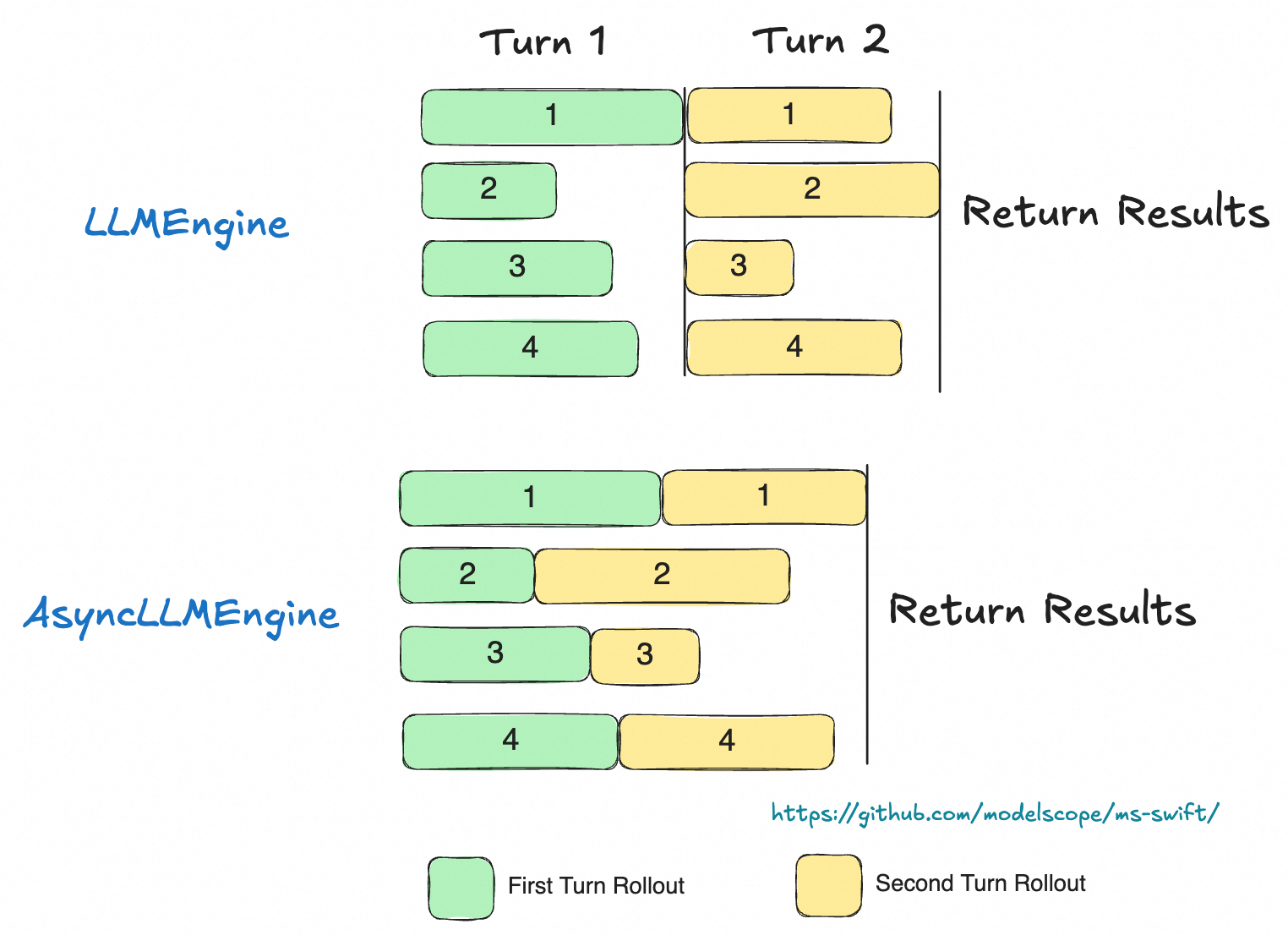
推荐使用 AsyncEngine 来实现高效的批量数据异步多轮采样(只支持 external server mode),AsyncEngine 在多轮推理时能够减小推理过程中的计算气泡(如图)
多轮规划器主要承担两大功能:
- 终止条件判断:通过 check_finished 方法判断当前轮次推理是否应该结束
- 推理请求构造:通过 step 方法构建下一轮推理的请求对象
抽象基类 MultiTurnScheduler 代码如下
```python
class MultiTurnScheduler(ABC):
def __init__(self, max_turns: Optional[int] = None, *args, **kwargs):
self.max_turns = max_turns
@abstractmethod
def step(self, infer_request: 'RolloutInferRequest', result: 'RolloutResponseChoice',
current_turn: int) -> Union['RolloutInferRequest', Tuple['RolloutInferRequest', Dict]]:
pass
def check_finished(self, infer_request: 'RolloutInferRequest', result: 'RolloutResponseChoice',
current_turn: int) -> bool:
if result.finish_reason == 'length':
return True
if self.max_turns and current_turn >= self.max_turns:
return True
return False
```
> 如果你想要奖励函数获取多轮交互中的信息,请在 step 方法中返回额外的 dict 对象, 在奖励函数中的 kwargs中,获取 `multi_turn_infos`
```python
class Scheduler():
def step(self, infer_request: 'RolloutInferRequest', result: 'RolloutResponseChoice',
current_turn: int) -> Union['RolloutInferRequest', Tuple['RolloutInferRequest', Dict]]:
...
return infer_request, extra_dict
class RewardFunction():
def __call__(self, completions, **kwargs):
infos = kwargs.get('multi_turn_infos', {})
...
```
step 和 check_finished 方法接收参数:
- infer_request: 上轮的推理请求,包括
- `messages` 键包含了模型的交互历史(注意:已包括当前模型推理结果)
- 多模态信息,如 `images`
- `data_dict` 包含了数据集中的其他列
- result: 上轮的推理结果,
- current_turn: 当前推理轮次 (从1开始)
入参示例
```python
infer_request
"""
RolloutInferRequest(
messages=[
{'role': 'system', 'content': 'A conversation between User and Assistant. The user asks a question, and the Assistant solves it. The assistant first thinks about the reasoning process in the mind and then provides the user with the answer. The reasoning process and answer are enclosed within and tags, respectively, i.e., reasoning process here answer here \n'}, {'role': 'user', 'content': 'What is the value of $\\sqrt{36 \\times \\sqrt{16}}$?'},
{'role': 'assistant', 'content': 'To find the value of \\(\\sqrt{36 \\times \\sqrt{16}}\\), we will break down the problem step-by-step.\n\nFirst, we need to evaluate the inner square root:\n\\[\n\\sqrt{16}\n\\]\nWe know that:\n\\[\n4^2 = 16 \\implies \\sqrt{16} = 4\n\\]\n\nNext, we substitute this result back into the original expression:\n\\[\n\\sqrt{36 \\times \\sqrt{16}} = \\sqrt{36 \\times 4}\n\\]\n\nNow, we need to evaluate the product inside the square root:\n\\[\n36 \\times 4 = 144\n\\]\n\nSo, the expression simplifies to:\n\\[\n\\sqrt{144}\n\\]\n\nFinally, we determine the square root of 144:\n\\[\n\\sqrt{144} = 12\n\\]\n\nThus, the value of \\(\\sqrt{36 \\times \\sqrt{16}}\\) is:\n\\[\n\\boxed{12}\n\\]'}
],
images=[],
audios=[],
videos=[],
tools=None,
objects={},
data_dict={
'problem': 'What is the value of $\\sqrt{36 \\times \\sqrt{16}}$?',
'solution': "To solve the problem, we need to evaluate the expression \\(\\sqrt{36 \\times \\sqrt{16}}\\).\n\nWe can break down the steps as follows:\n\n1. Evaluate the inner square root: \\(\\sqrt{16}\\).\n2. Multiply the result by 36.\n3. Take the square root of the product obtained in step 2.\n\nLet's compute this step by step using Python code for accuracy.\n```python\nimport math\n\n# Step 1: Evaluate the inner square root\ninner_sqrt = math.sqrt(16)\n\n# Step 2: Multiply the result by 36\nproduct = 36 * inner_sqrt\n\n# Step 3: Take the square root of the product\nfinal_result = math.sqrt(product)\nprint(final_result)\n```\n```output\n12.0\n```\nThe value of \\(\\sqrt{36 \\times \\sqrt{16}}\\) is /\\(\\boxed{12}\\)."
}
)
"""
result
"""
RolloutResponseChoice(
index=0,
message=ChatMessage(
role='assistant',
content='To find the value of \\(\\sqrt{36 \\times \\sqrt{16}}\\), we will break down the problem step-by-step.\n\nFirst, we need to evaluate the inner square root:\n\\[\n\\sqrt{16}\n\\]\nWe know that:\n\\[\n4^2 = 16 \\implies \\sqrt{16} = 4\n\\]\n\nNext, we substitute this result back into the original expression:\n\\[\n\\sqrt{36 \\times \\sqrt{16}} = \\sqrt{36 \\times 4}\n\\]\n\nNow, we need to evaluate the product inside the square root:\n\\[\n36 \\times 4 = 144\n\\]\n\nSo, the expression simplifies to:\n\\[\n\\sqrt{144}\n\\]\n\nFinally, we determine the square root of 144:\n\\[\n\\sqrt{144} = 12\n\\]\n\nThus, the value of \\(\\sqrt{36 \\times \\sqrt{16}}\\) is:\n\\[\n\\boxed{12}\n\\]', tool_calls=None),
finish_reason='stop',
logprobs=None,
messages=None)
"""
# result.messages will be copied at the end of multi-turn inference.
```
默认的 `check_finished` 逻辑会在两种情况下停止推理
- 模型回复被截断,即超出了 `max_completion_length`
- 模型推理轮数超出了限制的最大轮数
推荐使用 AsyncEngine 来实现高效的批量数据异步多轮采样(只支持 external server mode),AsyncEngine 在多轮推理时能够减小推理过程中的计算气泡(如图)
 在 `rollout` 命令中使用参数 `use_async_engine` 来指定engine的种类
```bash
CUDA_VISIBLE_DEVICES=0 \
swift rollout \
--model xxx \
--use_async_engine true \
--multi_turn_scheduler xxx \
--max_turns xxx
```
通过参数`external_plugins`, 我们可以将本地的多轮规划器注册进 ms-swift 中,具体实现参考[代码](https://github.com/modelscope/ms-swift/blob/main/examples/train/grpo/plugin/plugin.py)
多轮训练脚本参考
- [server mode](https://github.com/modelscope/ms-swift/blob/main/examples/train/grpo/external/vllm_multi_turn.sh)
- [colocate mode](https://github.com/modelscope/ms-swift/blob/main/examples/train/grpo/internal/vllm_multi_turn.sh)
## 最佳实践
[插件代码示例](https://github.com/modelscope/ms-swift/blob/main/examples/train/grpo/plugin/plugin.py)中提供了两种多轮规划器的例子,实现在数学问题中提示模型再次思考并给出答案,分别对应两种多轮推理:
- 第一种方式(新一轮推理):新插入一轮对话,提示模型的答案错误,需要重新思考(math_tip_trick_multi_turn)
- 第二种方式(续写):回溯到模型的思考阶段,并加入思考错误的提示 (math_tip_trick)
## 注意事项
### 奖励函数
注意在奖励函数中,接受的 `completions` 参数为最后一轮模型回复,如果奖励函数需要根据模型多轮回复计算奖励,需要获取 `messages` 键来获取完整的多轮对话记录
```python
class Reward(ORM):
def __call__(completions, **kwargs):
print(kwargs.keys())
# dict_keys(['problem', 'solution', 'messages', 'is_truncated'])
messages = kwargs.get('messages')
...
```
### 损失掩码
在工具调用或环境交互返回结果时,若需将返回内容作为模型响应的一部分,建议对这些插入内容进行掩码处理,以确保模型在训练过程中不会对这些外部生成的内容计算损失。
这里需要通过设置参数 loss_scale ,实现自定义掩码逻辑,具体参考[定制化loss_scale文档](../../../Customization/插件化.md#定制化loss_scale)。
默认 loss_scale 值:
grpo训练(即设置`multi_turn_scheduler`),loss_scale 默认为`default`,即对 messages 中的 每一轮 response 进行训练
> 如果数据集中本身包含 assistant response 也会被计算入内,如果想要排除数据集中的response , 需要自定义 loss_scale
如果只想只计算最后一轮 response(rollout结果)损失,请修改为`last_round`
注意 loss_scale 可以用于
1. 标注需要训练的 tokens (0为不训练)
2. 放缩 tokens 的训练权重
而 GRPO 中暂不支持 loss_scale 的权重设置。
在 `rollout` 命令中使用参数 `use_async_engine` 来指定engine的种类
```bash
CUDA_VISIBLE_DEVICES=0 \
swift rollout \
--model xxx \
--use_async_engine true \
--multi_turn_scheduler xxx \
--max_turns xxx
```
通过参数`external_plugins`, 我们可以将本地的多轮规划器注册进 ms-swift 中,具体实现参考[代码](https://github.com/modelscope/ms-swift/blob/main/examples/train/grpo/plugin/plugin.py)
多轮训练脚本参考
- [server mode](https://github.com/modelscope/ms-swift/blob/main/examples/train/grpo/external/vllm_multi_turn.sh)
- [colocate mode](https://github.com/modelscope/ms-swift/blob/main/examples/train/grpo/internal/vllm_multi_turn.sh)
## 最佳实践
[插件代码示例](https://github.com/modelscope/ms-swift/blob/main/examples/train/grpo/plugin/plugin.py)中提供了两种多轮规划器的例子,实现在数学问题中提示模型再次思考并给出答案,分别对应两种多轮推理:
- 第一种方式(新一轮推理):新插入一轮对话,提示模型的答案错误,需要重新思考(math_tip_trick_multi_turn)
- 第二种方式(续写):回溯到模型的思考阶段,并加入思考错误的提示 (math_tip_trick)
## 注意事项
### 奖励函数
注意在奖励函数中,接受的 `completions` 参数为最后一轮模型回复,如果奖励函数需要根据模型多轮回复计算奖励,需要获取 `messages` 键来获取完整的多轮对话记录
```python
class Reward(ORM):
def __call__(completions, **kwargs):
print(kwargs.keys())
# dict_keys(['problem', 'solution', 'messages', 'is_truncated'])
messages = kwargs.get('messages')
...
```
### 损失掩码
在工具调用或环境交互返回结果时,若需将返回内容作为模型响应的一部分,建议对这些插入内容进行掩码处理,以确保模型在训练过程中不会对这些外部生成的内容计算损失。
这里需要通过设置参数 loss_scale ,实现自定义掩码逻辑,具体参考[定制化loss_scale文档](../../../Customization/插件化.md#定制化loss_scale)。
默认 loss_scale 值:
grpo训练(即设置`multi_turn_scheduler`),loss_scale 默认为`default`,即对 messages 中的 每一轮 response 进行训练
> 如果数据集中本身包含 assistant response 也会被计算入内,如果想要排除数据集中的response , 需要自定义 loss_scale
如果只想只计算最后一轮 response(rollout结果)损失,请修改为`last_round`
注意 loss_scale 可以用于
1. 标注需要训练的 tokens (0为不训练)
2. 放缩 tokens 的训练权重
而 GRPO 中暂不支持 loss_scale 的权重设置。